AI object removal: paint out what you don't want in a photo
Paid per use with credits
Brush over wires, passers-by or clutter and AI fills in the background. One result per run; the filled area is AI-generated. Credits per run; sign-in required.
This tool is paid per use with credits; the prices page always shows the current cost.
Highlights
- Brush over wires, passers-by or clutter to remove them
- Adjustable brush size; undo a stroke or clear and start over
- One result per run, and failed runs are not charged
- The removed area is AI-generated, and the file name carries an AI mark
- Sign-in required
Examples
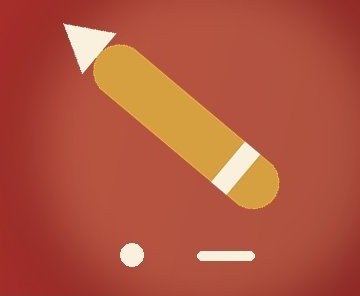
Original 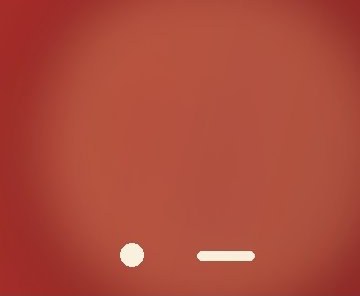
AI-generated The example is a banner image with the gold pencil brushed out: the red gradient carries on naturally, and the dot and bar that were not brushed stay as they were.
How to use
- Sign in, open the editor and choose or drop in a photo
- Pick “Remove object” in the toolbar and brush over what you want gone, covering a little past its edges
- Click “Remove” and wait; it usually takes about a minute
- If you are not happy, brush again and restart; if you are, download it, and it is also kept in “My results”
How to brush for the best result
Cover the whole thing and go a little past its edges; if you brush too little, a faint trace can be left at the edge. If you start without brushing anything, nothing is uploaded and nothing is charged.
What to expect
The removed area is filled in by AI and may differ from the real background; the file name carries an AI mark and the page labels it too. Output uses standard color (sRGB).
Larger photos are shrunk before processing and the result has the shrunk size; the page tells you the exact size up front. Images that are too small are refused with the reason shown, and nothing is charged.
Cost, failures and the daily limit
It uses credits per run; see the prices page for the amount, which the tool also shows before you start. Failed runs are not charged. Brushing again and restarting re-uploads the original and is charged again.
Each account has a daily limit on object removal, and the page shows how many you have used today. If the image or the result is blocked by content review, nothing is charged, and object removal is paused for your account for a while (up to 24 hours) to prevent abuse.
Where results are kept, and privacy
Finished images are saved automatically in “My results” in this browser for 7 days and only your account can see them; switching browsers, clearing browser data or signing out removes them, so download what you want to keep.
Upload only images you have the right to edit; unlawful content is not allowed, see the user agreement. The image and your brushed area are handled by a third-party AI service, see the privacy policy.
FAQ
- How much does AI object removal cost?
- It uses credits per run; see the prices page. Prices can change, so go by the prices page and the amount shown in the tool.
- Am I charged if it fails?
- No. Failed runs, expired upload tokens and content-review blocks are not charged.
- Does the filled-in area match the real background?
- Not necessarily. The removed area is AI-generated and may differ from the real background.
- What if I brushed the wrong spot?
- Undo a stroke, or clear everything and brush again; nothing is charged until you click Remove.