Batch process images online
Free
Pick up to 50 photos at once, resize, rotate or convert them with one set of options, and download the results as a single zip. Everything runs in your browser; photos are not uploaded.
Highlights
- Up to 50 photos at a time, one set of options
- Resize, rotate, and convert to PNG, JPEG or WebP
- Results packed into one zip
- Everything runs in your browser; photos are not uploaded
- Free to use
Examples
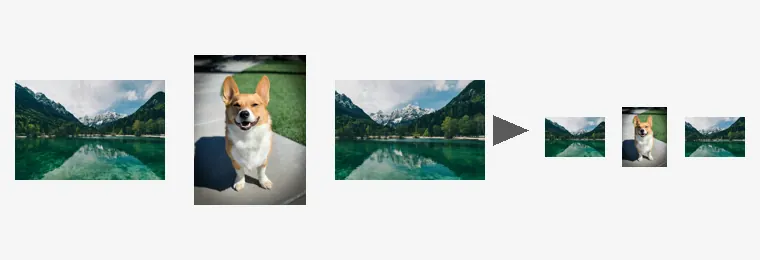
After Illustration: three photos processed with one resize setting come out as three smaller photos (an illustration, not a screenshot of the interface)
How to use
- Open the editor and pick “Batch” in the toolbar
- Choose photos, then set how to resize, how far to rotate, the output format and a file-name suffix
- Click process and download the zip when the progress finishes
What you can set
Resize has three modes: keep the original size; scale by a percentage between 1 and 400; or limit the size, which shrinks a photo, keeping its proportions, until it fits within the width and height you enter and leaves smaller photos as they are.
Rotate can be none, 90° clockwise, 180° or 90° counter-clockwise. The output format can be PNG, JPEG or WebP, with a quality setting for JPEG and WebP. A file-name suffix is added after the original name; leave it empty to keep names unchanged.
Limits for one batch
A batch holds up to 50 photos. Duplicates already in the list and files that aren't images are ignored. You can cancel at any time and keep what has finished.
The results are built into one zip in your browser. When it reaches its size limit, processing stops and hands you what is done; run the rest as another batch. If one photo fails, the reason is listed and the other photos are not affected.
Which images work
JPG, PNG and WebP images are supported, up to 50 MB per file and 40 megapixels. Animated images such as GIFs can't be edited; use a still image instead.
Images with a wide-gamut (Display P3) or CMYK color profile open too, with colors converted correctly; CMYK images are limited to 24 megapixels.
FAQ
- Are my photos uploaded?
- No. Everything runs in your browser; the photos are not sent to our servers or to any other service.
- How do I get the results?
- When processing finishes, click “Download zip”. Every processed photo is in that one zip. If you leave before downloading, you are asked first whether to discard it.
- Does it cost anything?
- This tool is free to use.